Initializing the Plugin
Every plugin has a client object that all its nodes need. You create it once with your credentials and region, store it in a variable, and pass it to every node.
| Plugin | Create node | Destroy node |
|---|---|---|
| Cognito (user pools) | Create Cognito Idp Platform | Destroy Cognito Idp Object |
| Cognito (identity pools) | Create Cognito Identity Platform | Destroy Cognito Identity Object |
| DynamoDB | Create Dynamo Db Object | Destroy Dynamo Db Object |
| GameLift Client | Create Game Lift Object | Destroy Game Lift Object |
| Lambda | Create Lambda Object | Destroy Lambda Object |
| Polly | Create Polly Object | Destroy Polly Object |
| S3 | Create Aws S3 Object | Destroy S3 Object |
GameLift Server works differently. See Using the Plugin for it.
Inputs
| Input | Description |
|---|---|
| Credentials | Access Key Id and Secret Key of the IAM user. Add a Session Token for temporary credentials, for example from Cognito. |
| Client Configuration | The Region of your AWS resources. The default is eu-central-1, so change it if your resources are in another region. The other settings are timeouts, proxy and endpoint options and can be left at their defaults. |
| Callback | An event that is called when the client object is ready. |
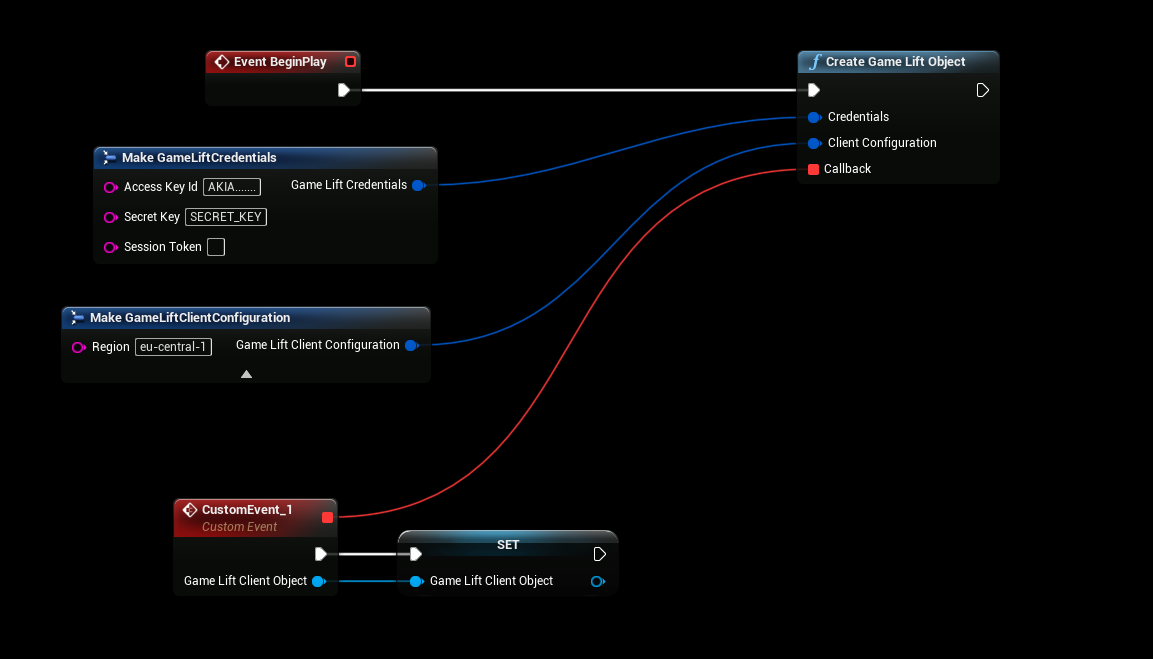
Wait for the callback
The client object is created in the background. Store the object you get in the Callback in a variable, and only call nodes after that.
warning
If you call a node before the callback, or with an empty variable, the node does nothing and logs Client object is not valid, create it and wait for its callback before calling this function.
When you no longer need the client object, call its destroy node.
Next: Using the Plugin